JointJS+ Changelog v4.3.0
Overview
The main engineering focus over the past months went into shipping JointJS for React — native components and hooks that let you build JointJS diagrams the React way, no wrappers or workarounds.
Not on React? 4.3 still lands plenty on its own: tree shaking support for leander bundles, first-class HTML in magnets and highlighters, packaging and tooling upgrades, new Angular and genogram examples, and a round of core dia and ui fixes.
Introducing JointJS for React
JointJS for React is an idiomatic React API built on the JointJS engine — not a wrapper around the existing API. Components and hooks map the diagram lifecycle onto React's, so you manage graphs, papers, and elements with the same rendering and state patterns you already use across your app, with the full power of the core library behind it. Full API reference and guides: JointJS React documentation.
Dedicated repository for JointJS demos
We have created a dedicated repository for JointJS demos, which can be found at clientIO/joint-demos. This repository contains a collection of example projects that demonstrate various use cases and integrations of JointJS, including Angular, React, and other frameworks. The demos are organized into separate folders for easy navigation and exploration.
You can easily browse and scaffold these demo projects using the new @joint/cli command-line tool, which allows you to quickly set up a demo project without cloning the entire repository.
SVG export
The toSVG() function gains two new options for producing self-contained exports:
useComputedStyles: 'full'— copies the entire computed style of every element onto the exported SVG clone as inline styles, including::before/::afterpseudo-elements. The previous behavior (diffing against browser defaults) is now called'minimal'and remains the default.embedFonts— fetches all font-face URLs referenced by the paper and embeds them as base-64 data URIs, making the exported file fully self-contained when viewed outside the browser.
Both options are forwarded through toDataURL() for raster exports.
HTML elements support for magnets and highlighters
In this version we introduced a new feature that allows HTML elements to be used as magnets and highlighters. This means that you can now use HTML elements as magnets for links, and also use them with highlighters. This opens up new possibilities for creating more interactive and visually appealing diagrams using HTML instead of SVG.
Packaging and developer tooling
With this version we have improved our packaging and developer tooling to make it easier to use JointJS+ in modern web development environments:
- Tree-shaking —
@joint/coreand@joint/plusnow include ES module entry points andsideEffectsconfiguration, enabling bundlers to eliminate unused exports. @joint/cli— a new command-line tool for browsing and scaffolding JointJS demo projects from theclientIO/joint-demosrepository without cloning the entire repo.
apps
Angular components in JointJS elements
This new example demonstrates how to integrate JointJS with Angular using custom element views that render Angular components inside the views.
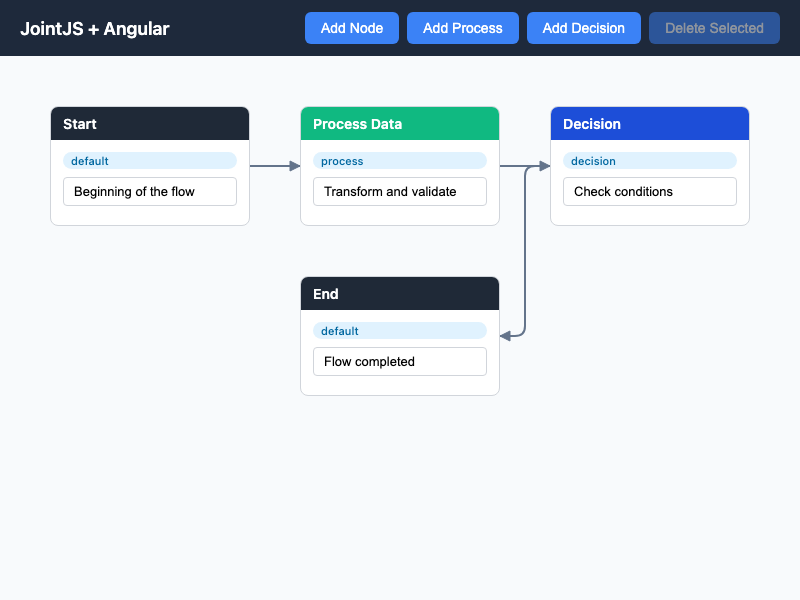
You can find full guide and source code for this example in the JointJS+ demos repository.
Genogram
A genogram is an extended family tree diagram used in medicine, psychology, and social work. Beyond basic lineage, genograms encode additional information through standardized symbols — males as rectangles, females as ellipses, deceased persons marked with an X, and adopted persons shown with brackets. This app uses JointJS with the @joint/layout-directed-graph package to automatically lay out multi-generational family data.
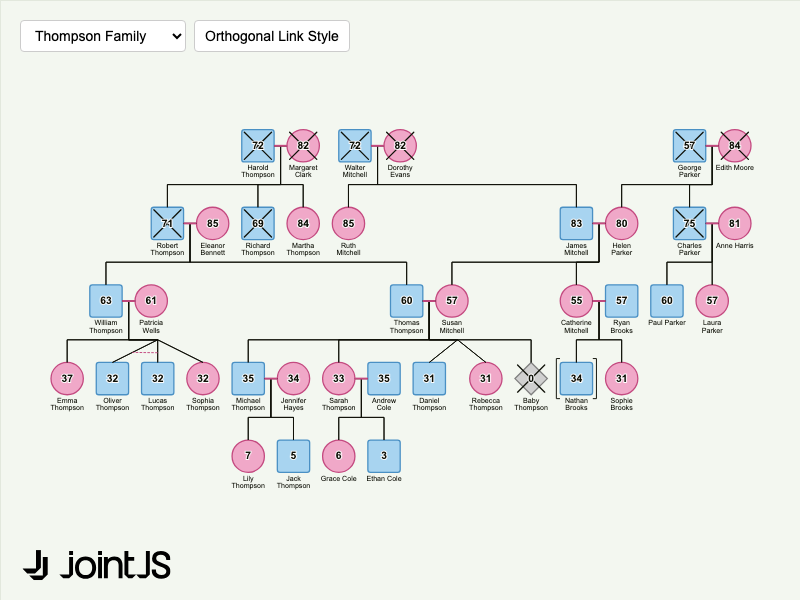
You can access source code for this example in the JointJS+ demos repository.
HTML form ports
The HTML Form Ports demo showcases a small data-mapping application built from elements that render HTML inside a <foreignObject>. A form element has a port directly under each of its fields; interface elements (input and output) are lists of items with a port next to each row. All ports belong to a single ports group with an absolute position layout — the port coordinates are measured from the rendered HTML, so they stay aligned with the content regardless of the layout. Values propagate along the mapping links: from the input interface into the form's input fields, through the form's computed fields (filled dynamically from the input fields), and on to the output interface.
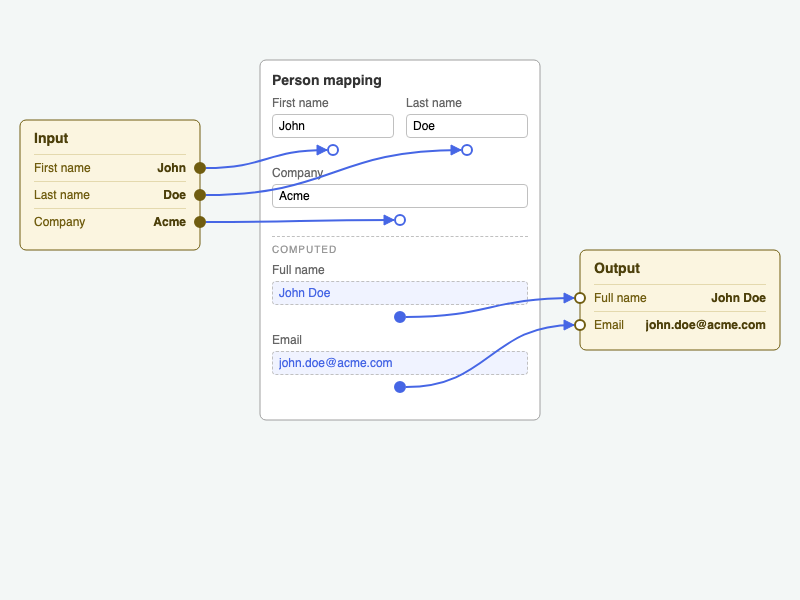
You can access source code for this example in the JointJS+ demos repository.
Microservice architecture
Microservice architecture example provides a boilerplate for modeling microservices with services, databases, and groups organized into containers, with links that intelligently route between groups.
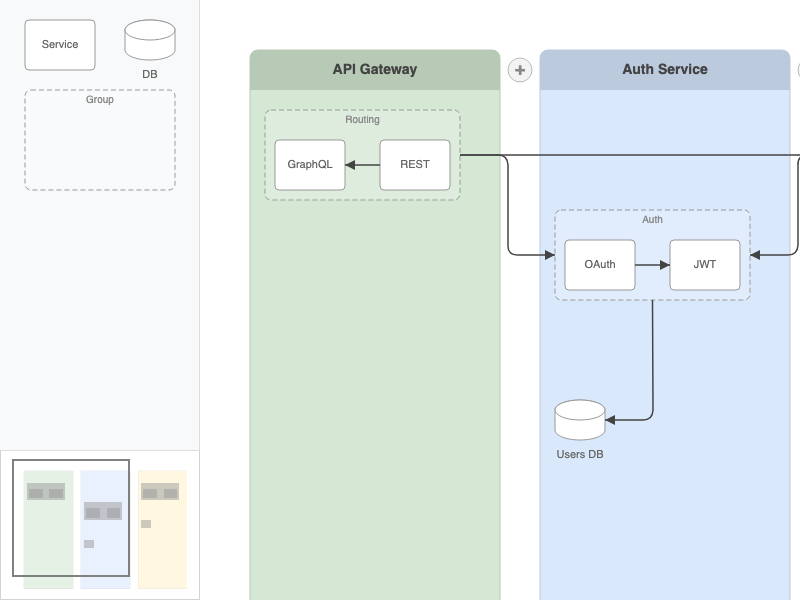
You can access source code for this example in the JointJS+ demos repository.
format
SVG
format.SVG – new 'full' mode for useComputedStyles with pseudo-element capture and embedFonts support
The toSVG() function now accepts useComputedStyles: 'full' (or a ComputedStylesCopyOptions object) to copy the entire computed style of every element in the paper — including ::before and ::after pseudo-elements — directly onto the exported SVG clone as inline styles.
The previous default behaviour (diffing against browser defaults, now called 'minimal') is unchanged for callers that pass true or omit the option.
A new embedFonts boolean option fetches all font-face URLs used by the paper and embeds them as base-64 data URIs in the exported SVG, making the file fully self-contained when viewed outside the browser.
Both options are also forwarded through toDataURL() for raster exports.
Visio
format.Visio – fix B-spline and NURBS curve conversion to SVG cubic Bézier paths
Fix two issues in the B-spline curve renderer used when importing Visio diagrams:
- Floating-point accumulation: the loop stepping (
t += step) could overshoot1.0due to floating-point rounding, silently dropping the curve's endpoint. The loop now uses integer steps (i / steps) to guarantee the endpoint is always included. - Rounding during control-point derivation: intermediate coordinates were rounded before being passed to the Bézier fitting algorithm, which compounded the error. Rounding is now deferred to the final SVG output.
format.Visio – fix segment removal index for curve deduplication
Fix an off-by-one error in the geometry-section curve deduplication logic. When removing a duplicate trailing segment, the wrong segment index was used, leaving the duplicate in place instead of removing it.
ui
Navigator
ui.Navigator – CSS-driven sizing and new getInnerSize() method
The Navigator now tracks its own DOM size via ResizeObserver and automatically recomputes the content ratio whenever the element is resized by CSS (calc(), flex, %, etc.). Previously the Navigator only recalculated on graph events, so CSS-driven resizes were ignored.
A new protected method getInnerSize() returns the inner pixel dimensions of the navigator element — the outer DOM size minus the uniform padding option — and stays accurate across CSS-driven resizes.
The width and height options now accept string values (e.g. CSS units) in addition to numbers.
Selection
ui.Selection – handle groups, getHandle(), hideOnDrag, custom className, and handle data
Several new features which mimic Halo overlay handles have been added to Selection handles:
- Handle groups (
options.groups): handles can now be organized into named position groups (e.g.'top','bottom','left','right'). Each group renders its handles using a CSS grid layout. Built-in position groups matching the default handle positions are provided by default. To enable default groups provideoptions.groups = {}. getHandle(name): retrieves a handle descriptor by name, making it easier to inspect or modify individual handles after initialization.hideOnDrag: when set on a handle, the handle is hidden during drag operations.className: an optional extra CSS class can be added to individual handle elements.- Handle data: arbitrary data can be attached to handles and read back via the existing handle event context.
ui.Selection – fix initialization logic to allow overriding getDefaultHandle static method in subclasses
Fix an issue where the Selection constructor wasn't calling the static getDefaultHandle() method during initialization, preventing subclasses from overriding the default handle definitions.
ui.SelectionWrapper – expose overridable DEFAULT_VISIBILITY class property
SelectionWrapper now declares a DEFAULT_VISIBILITY class property (default: true) that controls whether the selection wrapper is shown by default when a selection exists.
Previously the fallback value was hardcoded to true inside shouldBeVisible(). It can now be overridden by a subclass to change the default without replacing the full method:
class HiddenByDefaultWrapper extends SelectionWrapper {
    DEFAULT_VISIBILITY = false;
}
Halo
ui.Halo – fix initialization logic to allow overriding getDefaultHandle static method in subclasses
Fix an issue where the Halo constructor wasn't calling the static getDefaultHandle() method during initialization, preventing subclasses from overriding the default handle definitions.
FreeTransform
ui.FreeTransform – fix flicker caused by deferred paper transform update
Fix a visual flicker that occurred when the paper's transform changed (e.g. during zoom) while a FreeTransform widget was active. The widget now synchronously updates its position when the paper transform changes, eliminating the one-frame delay.
Snaplines
ui.Snaplines – correct filter callback signature to receive elementView
The filter callback option now receives the elementView being dragged as its second argument:
filter: string[] | dia.Cell[] | ((this: Snaplines, targetElement: dia.Element, elementView: dia.ElementView) => boolean);
Previously the callback only received the candidate snap target (targetElement), making it impossible to apply per-dragged-element filtering logic (e.g. hiding snap guides when dragging specific element types). The dragging elementView is now passed so filters can make decisions based on both the candidate and the dragging element.
PaperScroller
ui.PaperScroller – fix text selection during panning
Fix an issue where starting a blank-drag pan could trigger native browser text or element selection.
In Firefox in particular, this selection would autoscroll the container when the pointer approached a scrollbar or the edge of the viewport, causing the paper to drift in the opposite direction to the user's pan gesture. The fix temporarily sets user-select: none on the scroller element for the duration of the pan and restores the previous value when panning ends.
Stencil
ui.Stencil – overridable paper constructors for group and drag papers
Two new overridable class properties have been added to Stencil:
PAPER_GROUP_CONSTRUCTOR— the constructor used when creating the internaldia.Paperfor each stencil group (and for the single ungrouped paper).PAPER_DRAG_CONSTRUCTOR— the constructor used when creating the transient drag paper.
Both default to dia.Paper. Extending Stencil and overriding these properties allows you to substitute a custom Paper subclass — for example, a React-aware paper — without overriding the full stencil rendering logic.
ui.Stencil – use getCellNamespace() for defaultCellNamespace
The defaultCellNamespace getter now calls paper.model.getCellNamespace() instead of reading the internal layerCollection.cellNamespace property directly, making it compatible with new getCellNamespace() implementations.
layout
TreeLayout
layout.TreeLayout – support nested property paths in attributeNames
The attributeNames option of TreeLayout now resolves values with element.prop() instead of element.get().
This means attributes like offset, margin, prevSiblingGap, nextSiblingGap, siblingRank, firstChildGap, and layout can now be stored at nested paths (e.g. 'custom/layout') rather than only at top-level model attributes.
StackLayout
layout.StackLayout – support nested attribute paths for stackIndex properties
StackLayout now uses element.prop() and element.prop(path, value) instead of element.get() / element.set() when reading and writing the stackIndexAttributeName and stackElementIndexAttributeName attributes.
Nested paths (e.g. 'stack/index') are now supported for both properties.
dia
Paper
dia.Paper – originX / originY options for getFitToContentArea()
Two new options — originX and originY — can be passed to paper.getFitToContentArea() to shift the grid anchor to a specific paper-local coordinate before the fit rectangle is computed. The returned Rect is translated back into absolute coordinates so callers receive a result consistent with the rest of the paper coordinate system.
When omitted, both default to 0, reproducing the previous behavior exactly.
dia.Paper / dia.Graph – typed EventMap for IDE autocomplete on on() calls
New exported types dia.Paper.EventMap and dia.Graph.EventMap map every built-in event name to its handler signature. paper.on(…) and graph.on(…) now produce IDE autocomplete suggestions and compile-time checks on event names and callback arguments. Untyped string calls continue to compile unchanged via a fallback overload.
dia.Paper – new getCellView() method for strict view lookup
A new paper.getCellView(cell) method returns the CellView instance for a cell only if it has already been instantiated. Unlike paper.findViewByModel(), it does not resolve placeholder views and does not schedule any rendering updates — making it safe to call from pointer-event handlers or during virtual rendering:
const cellView = paper.getCellView(cell);
if (cellView) {
    // cell is currently rendered — safe to inspect the DOM
}
Returns null if no real view exists for the cell (e.g. the cell is outside the virtual rendering viewport or has not been rendered yet).
dia.Paper – setDragging() and isDragging() for drag-state access
Two new public methods expose the paper's internal drag state:
paper.isDragging(evt)— returnstrueif the paper is currently tracking a pointer drag for the given event.paper.setDragging(evt)— marks the active pointer event as a confirmed drag. Called internally byElementView,LinkView, andCellViewas soon as a drag action is confirmed (element move, link move, label drag, arrowhead drag, new-link creation from a magnet).
These are primarily for plugin and tool authors who manage pointer capture outside the paper's built-in event pipeline.
dia.Paper – auto-emit 'resize' event on CSS-driven size changes
dia.Paper now attaches a ResizeObserver to its host element on render() and automatically emits the 'resize' event whenever the host container's dimensions change due to external CSS — flex, percentage units, viewport units, media queries, etc.
Previously the 'resize' event only fired when paper.setDimensions() was called explicitly. Existing 'resize' handlers that call fitToContent() or similar will now fire on CSS-driven resizes as well. The observer is torn down on paper.remove().
The event payload includes a { source: 'observer' } option flag that distinguishes auto-resize events from explicit setDimensions() calls.
dia.Paper – fix stale cell views when cells become hidden during batch update
Fix an issue where a cell view's pending update flags were silently discarded if the cell became hidden (via cellVisibility) while the paper was processing a batch of view updates. If the cell was later made visible again its view would appear stale, not reflecting changes that accumulated while it was hidden.
Applies when viewManagement.disposeHidden is false (the default).
dia.Paper – elementView / linkView receive nsView as second argument
A new type dia.Paper.CellViewCallback<V> captures the factory function signature used by paper.options.elementView and paper.options.linkView. The callback now receives (model, nsView) — where nsView is the namespace-resolved view class — instead of only (model). Existing callbacks that declare only one argument still compile (extra arguments are ignored in TypeScript).
GridLayerView
dia.GridLayerView – reads built-in patterns from the paper constructor's static field
GridLayerView now reads its built-in pattern definitions from paper.constructor.gridPatterns (the actual constructor of the paper instance) rather than a hardcoded module-level reference. A Paper subclass that defines static gridPatterns = { ... } will have those patterns automatically picked up by the grid renderer without any monkey-patching.
CellView
dia.CellView – getNodeBoundingRect() and new computeNodeBoundingRect() support HTML elements
cellView.getNodeBoundingRect(node) now correctly handles HTML elements in addition to SVG elements. For non-SVG nodes it falls back to getBoundingClientRect() and converts to local paper coordinates via paper.clientToLocalRect().
A new protected method computeNodeBoundingRect(node) provides this behavior and can be overridden in subclasses to customize bounding-rect computation for specific nodes. Passing an HTML node that is not visible or not attached to the document logs a warning and returns an empty Rect.
Graph
dia.Graph – getCellNamespace(), setCellNamespace(), getTypeConstructor(), getTypeDefaults()
Four new methods make the cell namespace a stable, first-class part of the Graph API:
graph.getCellNamespace()— returns the namespace object used to resolve cell type strings. Previously accessible only viagraph.options.cellNamespacedirectly.graph.setCellNamespace(namespace)— replaces the namespace and invalidates the type-defaults cache.graph.getTypeConstructor(type)— resolves a dotted type string (e.g.'standard.Rectangle') to its constructor using the namespace. Returnsnullif not found.graph.getTypeDefaults(type)— returns a frozen object of default attributes for the given type, cached per graph instance.
CellCollection.cellNamespace is now a read-only getter and is deprecated — use graph.getCellNamespace() and graph.setCellNamespace() instead.
dia.Graph – typed EventMap for IDE autocomplete on on() calls
New exported types dia.Graph.EventMap map every built-in event name to its handler signature. graph.on(…) now produces IDE autocomplete suggestions and compile-time checks on event names and callback arguments. Untyped string calls continue to compile unchanged via a fallback overload.
dia.Graph - add port and magnet options to getConnectedLinks()
Restrict the links returned by graph.getConnectedLinks(cell, options) to only those connected to a specific port or magnet:
const links = graph.getConnectedLinks(element, {
    inbound: true,
    port: 'port1', // only links connected to this port
    magnet: 'magnetSelector', // only links connected to this magnet
});
Cell
dia.Cell – predicate form for toJSON({ ignoreEmptyAttributes })
The ignoreEmptyAttributes option of cell.toJSON() now accepts a predicate function in addition to true/false:
cell.toJSON({
    ignoreEmptyAttributes: (key, path) => path.length === 1 && key === 'text'
});
The predicate receives the attribute key name and its full path array. It is applied in a bottom-up walk, so a parent object emptied by child removal becomes a candidate in the same pass.
dia.Cell – Cell.JSON, Cell.JSONInit types; GenericAttributes deprecated
Two new TypeScript types replace the overloaded GenericAttributes alias:
dia.Cell.JSON— the serialized form returned bycell.toJSON(). Includes a requiredidandtype.dia.Cell.JSONInit— the initialization form passed to constructors andgraph.fromJSON().idis optional.
dia.Cell.GenericAttributes (and the matching Element.GenericAttributes / Link.GenericAttributes) remain exported for backwards compatibility but are now marked @deprecated. Use dia.Cell.Attributes, dia.Cell.JSON, or dia.Cell.JSONInit depending on context.
anchors
midSide
anchors.midSide – new direction modes for axis-locked link exits
The midSide anchor now accepts four additional mode values for pinning link exits to a specific axis:
'top-bottom'— source exits from the top, target enters from the bottom.'bottom-top'— source exits from the bottom, target enters from the top.'left-right'— source exits from the left, target enters from the right.'right-left'— source exits from the right, target enters from the left.
These directional modes ignore the relative positions of the elements entirely. The existing 'auto', 'horizontal', 'vertical', 'prefer-horizontal', and 'prefer-vertical' values are unchanged.
highlighters
highlighters – add HTML element support in mask highlighter
Now, when a highlighter is applied to an HTML element (e.g. a foreignObject child), the mask highlighter returns a Rect in paper coordinates that bounds the HTML element's getBoundingClientRect() instead of returning an empty rectangle.
routers
rightAngle
routers.rightAngle – fix anchor point excluded from clearance bounding-box union
Fix a routing issue where the bounding-box union used to compute clearance gaps around source and target elements did not include the link's anchor points. When an anchor was offset outside an element's bounding box (e.g. via a custom anchor), the router could produce paths that passed through the anchor area. Anchor points are now included in the union.
routers.rightAngle – new minPathMargin, sourceMargin, and targetMargin options
Three new routing options give finer control over clearance margins:
sourceMargin/targetMargin— independent per-side margin overrides. When set, each side uses its own value instead of the globalmargin.minPathMargin— a cap applied only to the overlap-detection step. When the gap between source and target margin areas is smaller thanminPathMargin, the router routes through rather than detouring. This prevents unnecessary zig-zag detours when two elements are placed close together. Set to0to restore the previous behavior where all margin overlaps still trigger a detour.
mvc
View
mvc.View – classNamePrefix instance property to override the joint- CSS class prefix
A new classNamePrefix instance property on mvc.View controls the CSS class prefix applied to JointJS view elements. It defaults to 'joint-', preserving existing behavior.
const MyView = joint.mvc.View.extend({
    classNamePrefix: 'acme-',
    className: 'node', // root element gets class "acme-node"
});
Any existing CSS selectors using joint-* class names must be updated if you change the prefix.
config
config – new storeEmbeds option to suppress embeds attribute
A new config.storeEmbeds boolean (default true) controls whether the embeds attribute is still written to parent cells for backwards compatibility. When set to false, embeds is never written — the hierarchy is maintained entirely via the parent attribute and GraphHierarchyIndex, and change:embeds events are suppressed.
Vectorizer
Vectorizer – fix getRelativeTransformation() when screen CTM is non-invertible
Fix an error in getRelativeTransformation() when the browser returns a singular (non-invertible) screen CTM for an SVG element — for example, when the element is hidden via display: none or has a zero-area transform. The function now checks whether the matrix is invertible before calling matrix.inverse() and returns null in those cases, consistent with how it already handled a missing CTM.
Other changes
Layout CSS properties moved to inline JS style objects
The layout-critical CSS properties (position, pointer-events, touch-action, user-select) previously declared in the package CSS files for FreeTransform, Halo, Navigator, and Selection have been moved to inline JS style objects on the respective views.
These properties are no longer applied via CSS class selectors, which means external CSS overrides targeting these specific properties on the component root element will no longer take effect. Functional overrides (colors, borders, fonts, sizes, z-index) remain in CSS and are unaffected.
New @joint/cli package for managing demo projects
A new @joint/cli package provides a command-line tool for browsing and scaffolding JointJS example projects from the clientIO/joint-demos repository without cloning the entire repo:
# Browse available examples
npx @joint/cli list

# Download a named example into a local directory
npx @joint/cli download kitchen-sink/js my-app
Additional flags: --owner and --branch target forks; --force overwrites an existing destination. Requires Node.js 22+ and Git.
Tree-shaking support enabled
The @joint/plus and @joint/core packages now includes proper ES module entry points and sideEffects configuration, allowing bundlers (Webpack, Rollup, Vite, etc.) to tree-shake unused exports and reduce bundle sizes.